
IPO
Invest in IPOs effortlessly through GalaxC.
Apply for IPOs and FPOs in companies listed or soon to be listed on BSE and NSE.

Applying for an IPO on GalaxC is simple
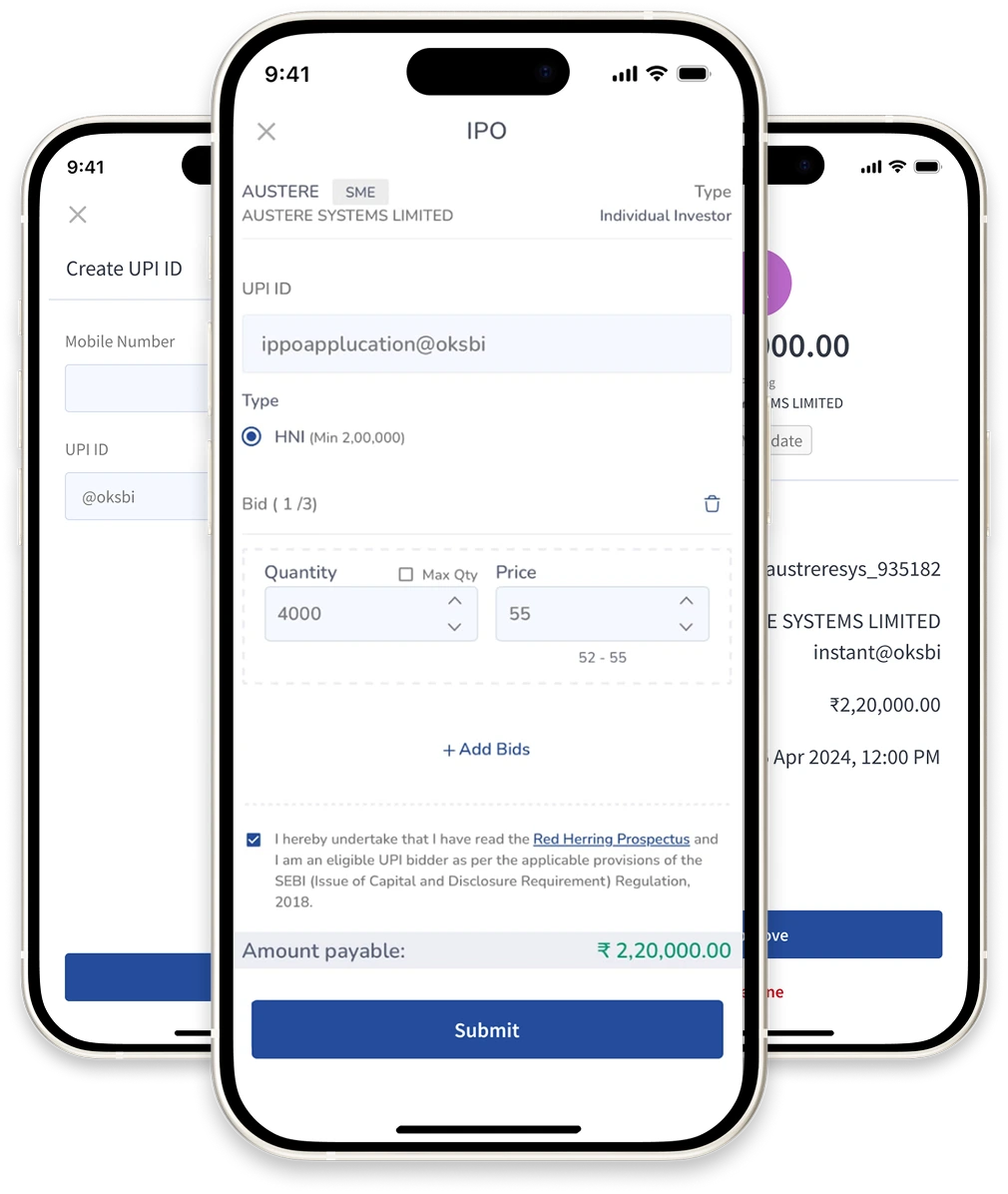

Create a UPI ID
Create a UPI Id using your UPI app.
Enter your bid details
Log in to the GalaxC app, navigate to the IPO section, tap 'Apply', then enter the quantity, price, and your UPI ID.
Approve the UPI mandate request
Approve the UPI mandate in your UPI app
Frequently Asked Questions
An IPO, or Initial Public Offering, is the process through which a private company offers its shares to the public for the first time, thereby becoming a publicly listed company on a stock exchange. Investors who subscribe to the IPO receive shares at the offer price, and once listed, these shares can be traded freely in the secondary market.
Through an IPO, the company raises capital from investors to fund its growth, expansion, debt repayment, or other corporate purposes.
Fixed‑Price Issue: The Company sets a predetermined price for its shares, and investors know exactly what they will pay when applying for the IPO. All shares are allotted at this single fixed price.
Book‑Build Issue: Instead of a single price, the company provides a price band (for example, ₹100–₹120 per share). Investors place bids within this range, indicating the price they’re willing to pay and the quantity of shares they want. After the bidding period closes, the final issue price called the cut‑off price is determined based on demand.
The cut‑off price is the final price at which shares are allotted in a book‑built IPO. During the IPO bidding process, investors place bids within the given price band (for example, ₹100–₹120). Once the bidding closes, the company evaluates all bids to determine the price at which the maximum shares can be allotted without exceeding the total issue size. This price is called the cut‑off price.
Retail investors can choose the ‘cut‑off option’ while applying, which means they agree to subscribe at whatever final price is discovered. This ensures they remain eligible for allotment even if they haven’t specified the exact price.
Lot size refers to the minimum number of shares an investor must apply for when subscribing to an IPO. Companies decide the lot size while launching the IPO and investors must bid in multiples of this lot. For example, if the lot size is 50 shares, an investor can apply for 1 lot (50 shares), 2 lots (100 shares), and so on.
Yes. The allotted shares from an IPO are credited directly to your Demat account in electronic form. A trading account is not mandatory for receiving IPO shares, but you will need one if you wish to sell those shares later in the stock market.
Yes. IPO applications can be made on behalf of a minor through their guardian’s account or under eligible investor categories such as NRI (Non‑Resident Indian) or HUF (Hindu Undivided Family).
Only one IPO application is allowed per PAN (Permanent Account Number). Submitting multiple applications under the same PAN even through different Demat or trading accounts is considered a duplicate application and will lead to rejection of all such bids
To apply for an IPO through the Centrum GalaxC app, open the main menu and tap on ‘IPO.’ Then select the ‘Open & Upcoming’ section to view the list of available IPOs. Choose you’re desired IPO and click ‘Apply’, enter the quantity and price and click on Submit to proceed with the application.
When you apply for an IPO using the UPI option, the entered UPI ID is used to block or earmark the required application amount in your linked bank account through the ASBA (Application Supported by Blocked Amount) process. Once you submit your IPO bid, a mandate request is sent to your UPI app (such as Google Pay, PhonePe, or BHIM). You must approve this mandate before the IPO application deadline by 5:00 PM on the closing day. Once approved, the amount remains blocked in your bank account, it is not debited immediately. If you receive an allotment, the blocked funds are debited, and the shares are credited to your Demat account. If you do not receive an allotment (or receive only partial allotment), the remaining blocked funds are automatically released back to your usable balance within 1–2 working days after allotment finalization.
- Re‑check your UPI ID, ensure it is correct and linked to your bank account.
- Wait a few hours sometimes the mandate arrives with a delay.
- Check in your UPI app’s ‘Pending Requests’ section.
- Contact Centrum Broking customer care if the mandate still doesn’t appear.
No, there are no brokerage charges or transaction fees for applying to an IPO through Centrum GalaxC. The application process is free, you only need to maintain sufficient balance in your bank account to cover the IPO application amount.
Issue closes on T day
Basis of allotment finalization is done on T+1 day
Shares are credited to demat account and funds are debited from bank account on T+2 day
Listing on NSE/BSE is done on T+3 day


